One-click AI photo editing
Change backgrounds, swap outfits, upscale to 4K, unblur, retouch and erase objects — all from your browser, all in seconds. No Photoshop, no plugins, no learning curve.
What is the AI photo editor?
The ProPicStudio AI photo editor is a browser-based toolkit that makes one targeted edit at a time using AI. You upload a photo, pick a tool, and either type a short prompt or choose a preset — the AI handles the masking, blending and content-aware fill for you. It can replace or remove a background, swap an outfit, upscale a small image, sharpen a blurry shot, retouch skin, erase unwanted objects, try on a new hairstyle, and restore old or damaged photos — each in seconds, with downloads up to 4K.
One photo, transformed
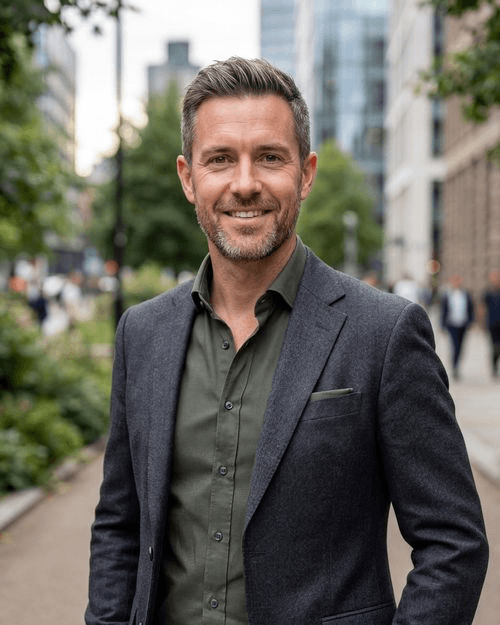
Drag the slider to compare a real before-and-after from the Background Changer.

From upload to download in four steps
Every tool follows the same simple flow — no settings to learn.
- 1
Upload a photo
Drag any JPG or PNG into the editor in your browser — no install, no plugins. Your photo loads instantly and stays inside your session.
- 2
Pick a tool
Choose what you want to do: change the background, swap an outfit, upscale, unblur, retouch skin, erase an object, restyle hair or restore an old photo.
- 3
Describe or preset
Type a short prompt (for example, “a clean gray studio” or “a navy business suit”) or pick a preset. The AI applies only that change and leaves the rest of your photo alone.
- 4
Download in up to 4K
Preview the result, fine-tune if needed, and export a high-resolution image — standard or up to 4K, ready for profiles, print and marketing.
Pick a tool to get started
Background Changer
Move yourself to a clean studio, a modern office, or anywhere else. Upload a photo and let AI swap the background in seconds — no green screen needed.
From 3 credits →Background Remover
Get a clean cutout with a true transparent background. Perfect for product shots, profile photos, and design work.
From 3 credits →Outfit Swap
Turn a casual snap into a business-ready look. AI swaps the outfit while keeping your pose, body, and identity intact.
From 3 credits →Photo Upscaler
Bring small or low-res images back to life. Upscale up to 4× while recovering natural detail and sharpness.
From 3 credits →Unblur
Rescue that almost-perfect shot. AI sharpens motion blur and soft focus to recover a usable, crisp image.
From 3 credits →Magic Eraser
Brush over anything you do not want — a photobomber, a sign, a power line — and AI cleanly fills it in.
From 3 credits →Headshot Retoucher
Get studio-grade retouching that still looks like you. Remove blemishes, brighten teeth, and smooth skin — with a slider so it never looks fake.
From 3 credits →Hairstyle Changer
Curious about a new cut or color? Preview different hairstyles on your own photo before you book the chair.
From 3 credits →Photo Restoration
Bring cherished memories back. AI repairs scratches, fading, and damage and can enhance resolution on old prints.
From 3 credits →A focused editor that respects your photo
Most AI tools try to do everything at once and end up rewriting your whole image. ProPicStudio takes the opposite approach: each tool makes one deliberate change and leaves the rest of your photo untouched. A background swap keeps your face, hair, pose and clothing exactly as they were and only relights the new scene. An outfit swap changes the clothing while preserving your pose and body proportions. Retouching evens skin and brightens eyes without erasing your real features. That restraint is what makes the results usable for professional profiles instead of obviously “AI.”
Everything runs in your browser — there is nothing to download, and you do not need Photoshop, Lightroom or any design experience. You type what you want in plain language or pick a preset, and the AI handles the difficult parts: clean edges around hair, seamless content-aware fill, natural fabric folds, and detail recovery on soft or low-resolution images. Exports go up to 4K, so a finished edit is sharp enough for print, large displays and high-resolution profile photos, not just a small web thumbnail.
Pricing is honest and simple. There is no subscription: you buy a one-time pack of credits and spend them only on the edits you actually make — 3 credits for a standard edit and 10 for a 4K export. Your uploads stay inside your session and are not shared or sold, and every pack is backed by a 14-day money-back guarantee. If an edit does not work out, you have not committed to a recurring bill.
Built for real, everyday fixes
Whatever you are editing, there is a one-click tool for it.
Professionals & job seekers
Drop yourself onto a clean studio background, swap a casual shirt for a suit, and retouch lightly for a polished result. For a full gallery from scratch, the LinkedIn headshot generator or our executive headshots pair perfectly with the editor.
Realtors, agents & teams
Standardize a whole team on one background color and outfit style. Agents getting listing-ready often start with real estate headshots and refine the final pick in the editor.
Ecommerce & creators
Cut products out to a transparent PNG, erase clutter with the Magic Eraser, and upscale small images to print resolution.
Families & memory-keepers
Bring old prints back with photo restoration, then unblur soft shots so faces are recognizable again. Need styling advice? See our guide to the best background for professional headshots.
One-time credit packs, no subscription
A standard edit is 3 credits; a 4K export is 10. Buy once, spend on any tool.
Starter
Everything you need for a polished LinkedIn or resume photo.
vs ~$300 photographer
- 200 credits
- ≈ 40 headshots or 66 edits/generations
- 20 images at 4K
- Looks-like-you guarantee
Professional
Our most popular tier — variety across outfits and backdrops.
vs ~$300 photographer
- 400 credits
- ≈ 80 headshots or 133 edits/generations
- 40 images at 4K
- Looks-like-you guarantee
- One free redo
Executive
Best value. The most credits for every style and high-res export.
vs ~$300 photographer
- 750 credits
- ≈ 150 headshots or 250 edits/generations
- 75 images at 4K
- Looks-like-you guarantee
- One free redo
Every tier includes our 14-day money-back guarantee. Downloading does not void it.
See full details on the pricing page.
Questions, answered
Edit smarter, not harder
Spend credits only on what you use. Buy a small one-time pack and try every tool.